Turn Complex Medical Records Into Nearly Completed Consultation and Follow-Up Notes in Minutes.
Upload patient records, choose a clinical template, and let VeloNote organize the information into a comprehensive, editable clinical note—before the patient arrives.
Built by a practicing physician. Works with your existing EMR. No technical integration required.
No credit card required • Full access for 14 days • No automatic charge
See the complete VeloNote workflow in 60 seconds.
See How VeloNote Works — In the Actual Product
Real screenshots showing the complete workflow from template selection to a finished, editable clinical note.
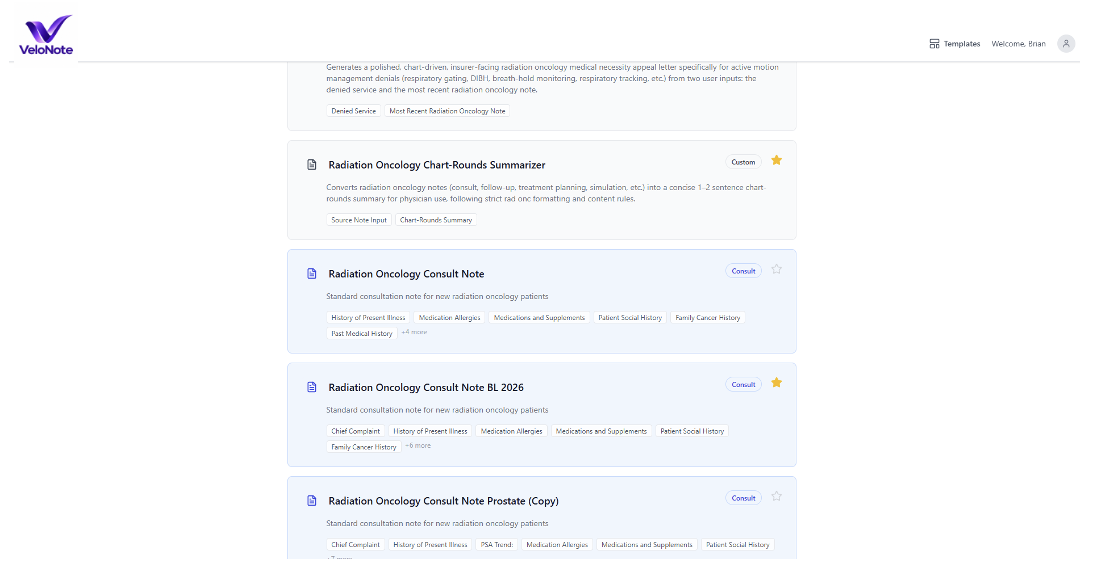
Select a Template
Choose from 49+ specialty-specific templates, or create your own custom template.
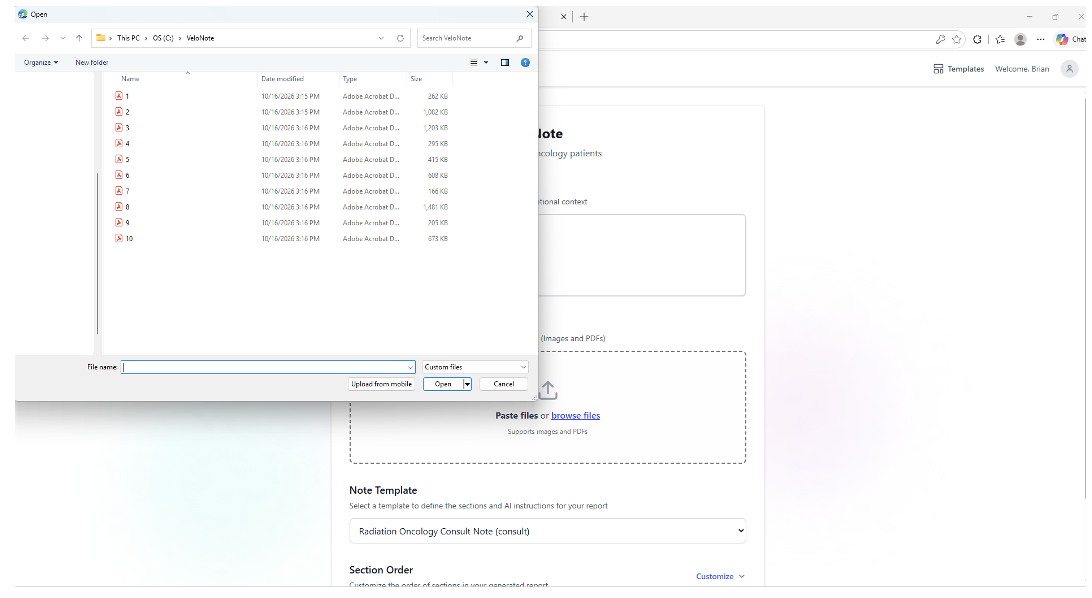
Upload Patient Records
Add PDFs, outside medical records, or paste clinical information.
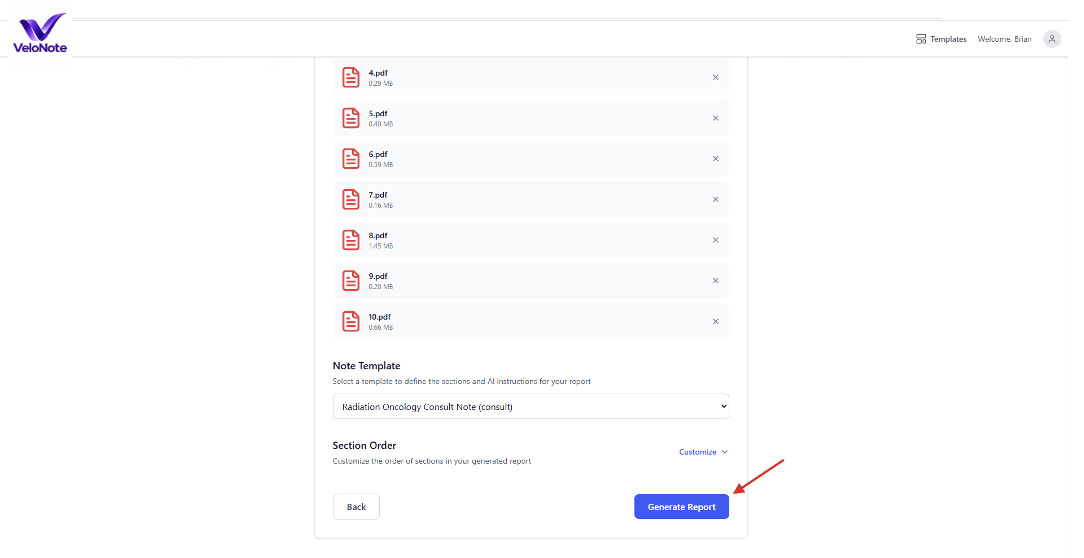
Generate the Note
Select your template and click Generate Report.
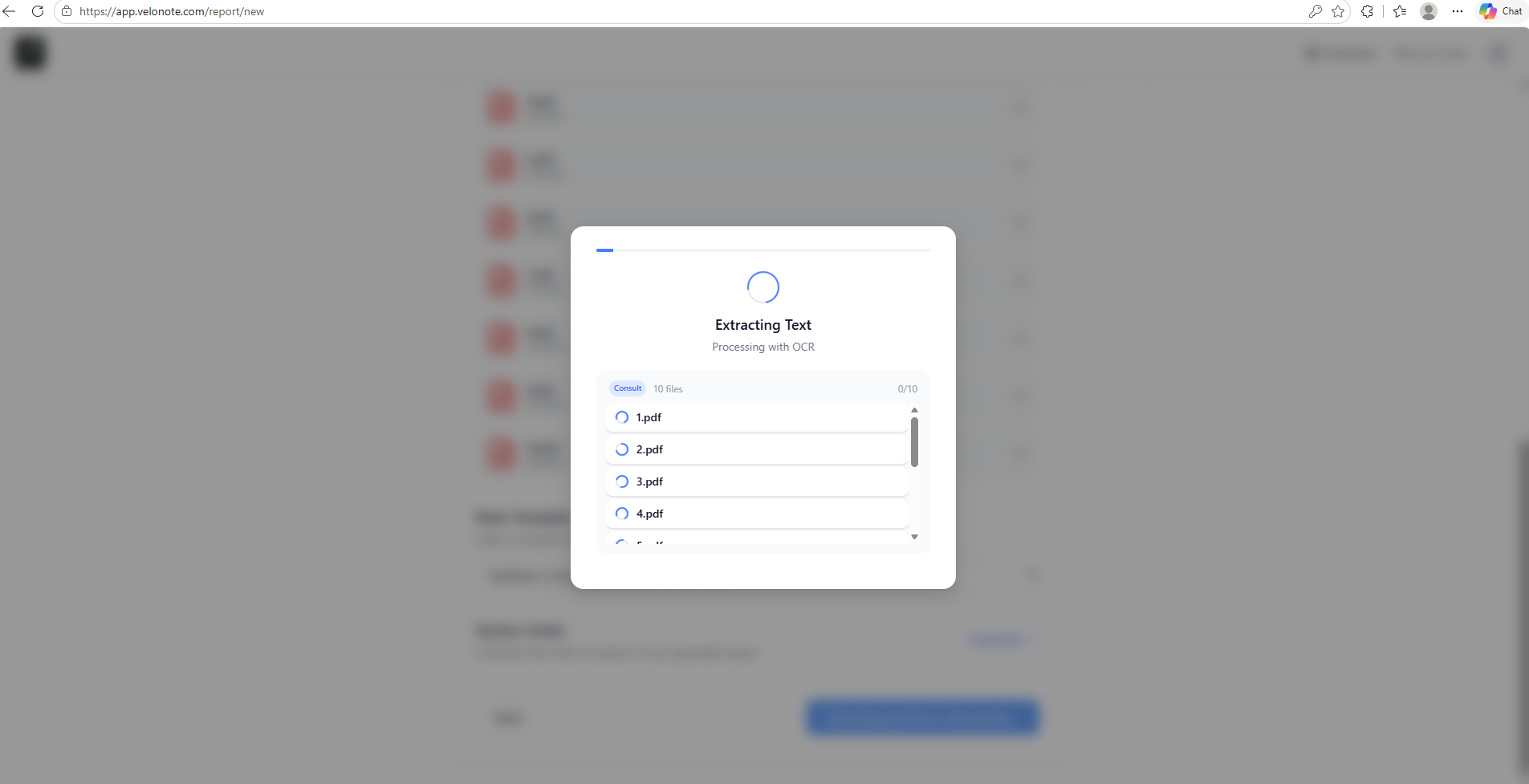
Extracts Relevant Clinical Information
VeloNote extracts text from your files and organizes the clinical history.
Review the Completed Note
A structured, editable clinical note ready for your review, with a chat assistant for refinements. This is the output that matters — open the full consultation note to see exactly what VeloNote produces.
Want an "Items to Verify" section in your notes?
Just include it in your customized template. VeloNote reviews every uploaded record for discrepancies, conflicting documentation, and missing information, then surfaces them in a dedicated section so nothing slips through before the encounter. You can see an example of this in the full consultation note below.
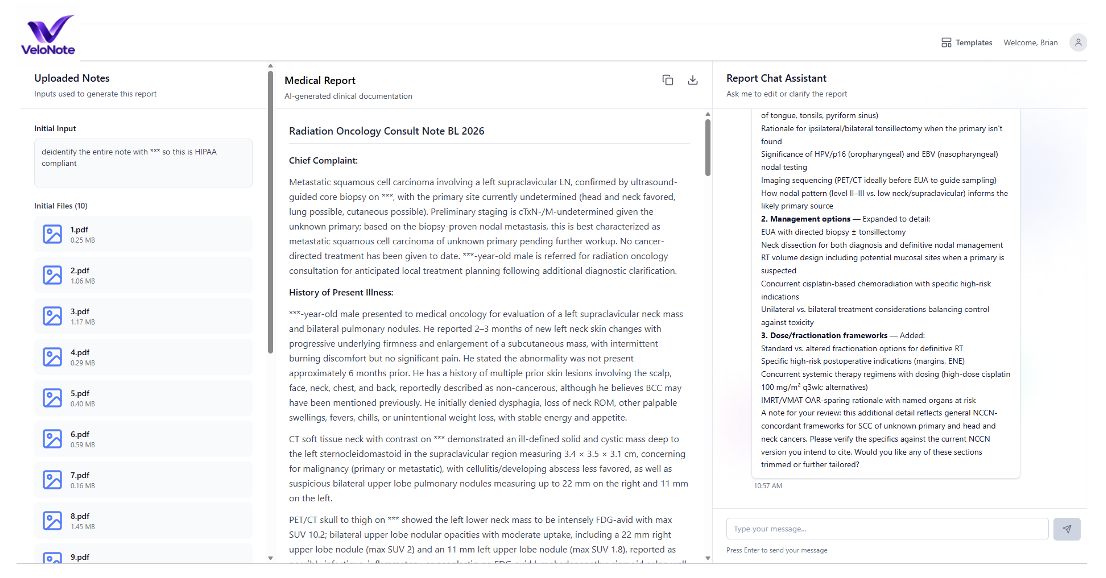
Opens a readable, scrollable copy of the complete example note.
Less Time Reviewing Records. More Time With Patients.
See how clinicians use VeloNote to prepare consultation notes, organize complicated medical histories, and reduce documentation workload.
"I use VeloNote every day to prep the new patients' consult notes. It saves me so much time, especially when we have six to eight new patients a day."
Radiation Oncology Physician Assistant
Florida
"VeloNote has been very helpful in my medical practice. It saves me valuable time. It also does an excellent job of organizing medical records that would otherwise be scattered from across multiple sources, bringing them together in a clear, logical timeline."
Radiation Oncologist
Florida
"I love it. Showed it to my partner and he loves it too."
From Hundreds of Pages of Medical Records to One Organized Clinical Note
The physician manually reviews multiple sources
- Outside medical records
- Prior consultation notes
- Imaging and pathology
- Laboratory results
- Surgery and treatment history
- Hospital records
Hours of potential chart review and documentation work.
An organized clinical note ready for review
- Chronological clinical history
- Relevant imaging and pathology
- Previous treatments
- Important findings
- Missing or conflicting information
- Structured note sections
A comprehensive draft ready for physician review and editing.
Spend less time searching through records and writing notes from scratch. Walk into the consultation with much of your documentation already prepared.
Three Simple Steps: Upload, Generate, Review
Upload or Paste Patient Information
Upload PDFs, outside medical records, or paste clinical information. Choose a consultation, follow-up, or other specialty-specific template.
Generates Your Clinical Note
VeloNote reviews the provided information, reconstructs the clinical timeline, identifies relevant findings, and organizes the details into your selected note format.
Review, Edit, and Transfer to Your EMR
Review and correct the generated note, add information as needed, and copy the completed content into your existing EMR for normal documentation and signing.
VeloNote works alongside your existing EMR. It does not require replacing your documentation system, installing new EMR software, or building a custom integration.
VeloNote Prepares the Chart Before the Visit. AI Scribes Document During the Visit.
Most AI scribes listen to the patient encounter and generate documentation from what is said. VeloNote addresses a different problem: reviewing and organizing the patient's existing medical records before the encounter begins.
During the Visit
- Works during the encounter
- Source: physician–patient conversation
- Captures encounter discussion
- Audio recording typically required
- Output: encounter note
Before the Visit
- Works before the encounter
- Source: existing medical records
- Organizes complex clinical histories
- No audio recording required
- Output: detailed pre-visit clinical draft
- Works together with ambient scribes
VeloNote and ambient AI scribes are complementary—not competing—technologies. VeloNote prepares the clinical history; the scribe documents what happens during the visit.
Works With Your Existing EMR—Without Requiring an Integration
VeloNote is a standalone, web-based clinical documentation tool. Clinicians can upload or paste patient information, generate and edit a clinical note, then transfer the completed content into their existing electronic medical record. VeloNote does not need direct access to your EMR database or a custom API connection to perform its core functions.
Standalone, web-based access — no custom EMR integration or changes to your existing documentation system required
VeloNote does not automatically retrieve patient charts from your EMR or automatically enter or sign notes. Clinicians control what information is provided and what documentation is transferred back.
One Tool. Multiple Clinical Documentation Workflows.
VeloNote supports a range of clinical documentation workflows, from new patient consultations to medical-legal reviews.
New Patient Consultations
Generate a comprehensive draft consultation note from prior medical records, including the patient’s history, relevant findings, and previous treatments.
Follow-Up Visits
Prepare an updated follow-up note incorporating interval imaging, labs, clinical events, and treatment changes.
Complex Oncology Cases
Organize years of cancer history, pathology, staging, surgery, systemic therapy, radiation treatments, and disease progression into a coherent timeline.
Medical Record Summaries
Convert extensive patient records into a concise, chronologically organized medical summary.
Prior Authorizations and Appeals
Create supporting clinical documentation and draft medical necessity or appeal letters using information from the patient’s medical records.
Medical-Legal and Expert Reviews
Develop organized clinical timelines, relevant findings, and summaries to support physician review.
And additional workflows for specialty-specific documentation, summaries, appeals, and physician-led review.
Generate Notes in the Format Your Specialty Already Uses
VeloNote includes more than 49 clinical templates for consultations, follow-up visits, medical summaries, and other documentation needs. Select an existing template or create a custom one that reflects your specialty, preferred note structure, and documentation style.
Templates determine how VeloNote organizes the output. For example, a radiation oncology consultation template arranges the relevant patient information into familiar consultation note sections.
Consultation Notes
Radiation Oncology Consult
Follow-Up Notes
Radiation Oncology Follow-Up
Consultation Notes
Cardiology Consultation
Follow-Up Notes
Cardiology Follow-Up
Consultation Notes
Internal Medicine Consultation
Follow-Up Notes
Internal Medicine Follow-Up
Need something different? Custom templates can be created to match your workflow.
Created by a Practicing Oncologist to Solve a Real Documentation Problem

I developed VeloNote because I was spending too much time reviewing scattered medical records and preparing notes before complex patient consultations.
As a busy radiation oncologist, I routinely review outside consultation notes, pathology reports, imaging studies, laboratory results, and years of previous treatments. Much of that information must be assembled into a clear clinical history before I can even begin the patient encounter.
I wanted an AI tool that could take those records, organize the relevant information, and produce a nearly completed consultation note—without requiring a new EMR or complicated software integration. VeloNote is the tool I built to solve that problem.
In my own practice, it has made pre-visit chart preparation at least three times faster, allowing me to spend less time on documentation and more time focused on patients.
Brian Lawenda, MD
Founder, VeloNote · Practicing Radiation Oncologist · Former U.S. Navy Commander
Designed for Healthcare Privacy, Security, and Clinical Data Protection
VeloNote is designed to support HIPAA-regulated clinical workflows with appropriate safeguards, access controls, and clinician oversight.
HIPAA-Regulated Workflows
Designed to support HIPAA-regulated clinical workflows with appropriate safeguards and business associate agreements.
Patient Data Retention
Patient records are processed for the active workflow under VeloNote’s defined data deletion and retention practices.
Restricted Access
Access to patient information is restricted through defined user permissions and technical controls.
Clinician Oversight
VeloNote generates editable drafts; the responsible clinician reviews and finalizes all clinical content.
For Hospital IT and Security Teams
Review our security architecture, including hosting, PHI handling, encryption, subprocessors, access controls, deletion, auditability, and BAAs.
Review Our Security ArchitectureFind the Right Plan for Your Clinical Workload
Start with Starter. Most clinicians can meet their documentation needs with our two most affordable plans. You can upgrade anytime if your usage increases.
14-day free trial • No credit card required • No automatic charge
Starter
The best way to get started with VeloNote.
- Included monthly usage for occasional documentation
- All note types, templates, and workflows
- Add more usage anytime — no overage charges
Clinician
For clinicians whose documentation needs exceed Starter.
- More included monthly usage for regular documentation
- All note types, templates, and workflows
- Add more usage anytime — no overage charges
Advanced
For clinicians with particularly high documentation volumes.
- Highest included monthly usage
- All note types, templates, and workflows
- Add more usage anytime — no overage charges
We recommend starting with Starter and upgrading only if your monthly usage increases.
Not sure which plan fits? Start with any plan during your 14-day trial — your dashboard shows usage as a percentage of your plan's included amount, so you can see in practice whether to stay or move up. Record length and complexity affect usage, and you can change plans or add usage at any time.
Included With Every Plan
VeloNote Usage
Each plan includes a different level of monthly VeloNote usage. Your account shows your current usage and VeloNote will notify you as you approach your plan limit.
Need more? Add additional usage or move to a higher plan at any time.
Adding multiple clinicians? Contact us for group pricing.
Evaluating VeloNote for a department or physician group? Contact us to discuss multi-clinician deployment, workflow requirements, security documentation, and group pricing.
Frequently Asked Questions
The most common questions about VeloNote, how it works with your EMR, and how patient information is protected.
Still have questions?
See how VeloNote could fit into your clinical workflow with a 1-on-1 walkthrough.
Schedule a 1-on-1 WalkthroughVeloNote generates draft documentation and summaries for clinician review. All outputs should be reviewed and edited by the responsible clinician before use in patient care, payer communication, or medical-legal work. VeloNote is designed to support documentation, not replace clinical judgment. The clinician remains responsible for reviewing, editing, and finalizing all output.
Your Next Patient Consultation Can Be Mostly Documented Before It Begins.
See how VeloNote turns complex patient records into an organized, editable clinical note—so you can spend less time preparing charts and more time caring for patients.
No credit card required • Full access for 14 days • No automatic charge